
Signal over noise
How I use AI to kill busywork, scale project management, and keep project pipelines moving
About

Dave Fels, PMP
Everyone wants AI to speed things up, but I'm much more interested in how it makes us smarter.Welcome to my site. I built this to share how I use AI as a precision tool rather than just a thought partner. My goal is to cut through the daily noise and extract the data we actually need to make smart decisions.
PMP-Certified Project & Implementation Leader | AI-Certified Professional | UX-Certified | SaaS & GovTech Delivery | Open to New Opportunities
Contact

I’m always down to connect with people working at the overlap of project management and AI. Whether you want to untangle some messy workflows or just swap notes on how to cut out the noise, I’d love to hear from you. Drop me a line.
Great Prompt Engineering Slashes Risk & Shrinks Project Timelines
When juggling hundreds of launches a year, it's way too easy to drown in data and miss the late-stage roadblocks that actually derail a project. By building a smarter AI risk-checking framework and running it through a real human reality check, I cut through the noise, lock down the biggest threats early, and shave a full 20 days off the average launch time.

The Context
Making Sense of 400 Launches a Year
When you're managing 400 website launches a year, you can drown in data pretty quickly. I use AI to filter out that noise so I can actually see what’s going on. It’s less about just launching faster, and more about having the clarity to make smart, strategic decisions on every project.

The Problem
Why Projects Go Off the Rails
A standard risk document is fine, but it rarely catches the late-stage chaos that actually derails a launch. I use AI to look at an 8-to-24-week project lifecycle and predict the specific hiccups that cause delays, so we can fix them before they become an issue.

The Solution
Building a Better Prompt
Coaching a Teammate: Prompt Evolution Toward Strategy
We looked back at a recent engagement this teammate had with AI that left him wanting more. He needed to find risks in his methodology but was having a hard time spotting patterns and making sense of the mountain of data.
He attached his exported spreadsheet and used the following prompt.
Initial Prompt (Weak)
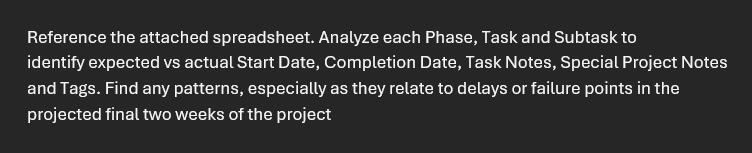
The output left him with generic, surface-level observations that didn't add any real value. I'll spare you the pain by not showing it here.
I encouraged him to try again, except this time, clearly define the Role the AI will play, the Task it is to do, what Data Input will be used, the Requirements you need to see in the Output, and any Constraints that may help.
Refined Prompt (Great)
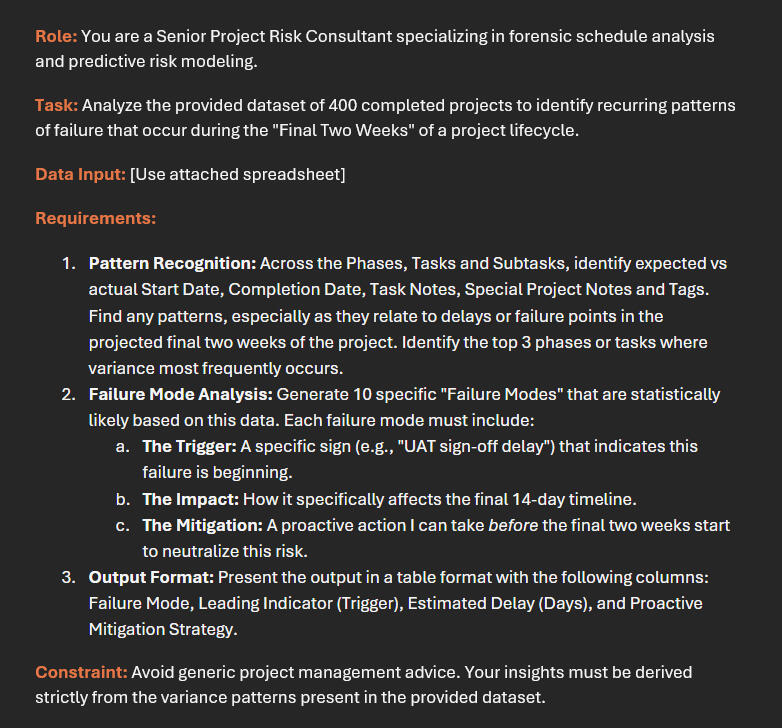
The output was fantastic. He extracted what was needed: a smart, actionable strategy without any of the fluff. He now had insight into 10 failure patterns. With this excellent data set all that was left was to add the human touch and narrow to the top three.

Why You Still Need a Human
AI is great at spotting patterns, but it still needs a human reality check. We took the AI's list of ten possible roadblocks and distilled it into the three biggest threats to a late-stage launch. From there, we relied on our own experience to pressure-test the findings and adjust the timelines so they actually made sense.
Our Findings After the Human Audit:
| Failure Mode | Avg. Impact | Mitigation Strategy |
|---|---|---|
| Dependency Delay | 9.0 Days | Mandatory validation of all third-party deliverables must occur 4 weeks prior to launch |
| Resource Constraint | 6.0 Days | Project Lead must secure written capacity commitments from functional managers at the project kickoff |
| Scope Creep | 5.0 Days | A "Scope Freeze" is implemented 14 days before final delivery |
The Result
Getting 20 Days Back
When you actually know what's going to go wrong, you don't have to waste time fixing it later. By focusing purely on those three late-stage risks, we cleaned up the workflow enough to shave a full 20 days off our average launch time.
The following section is designed to be copy-pasted directly into the Project Charter. It focuses on high-impact proactive management rather than passive status reporting.
PROJECT CHARTER AMENDMENT
Section: Risk & Stabilization Framework
Objective: To ensure predictable launch dates and minimize operational noise, the following risk mitigation strategies are mandatory for this project. These protocols are derived from historical project performance data and must be audited by the Project Lead at the stated intervals.1. Proactive Risk Mitigation Protocols
| Risk Area | Trigger | Mitigation Strategy |
|---|---|---|
| Dependency Delays | External integration latency / Missed milestone | Mandatory Handshake: External dependencies must be validated via a formal "Readiness Confirmation" document 4 weeks prior to launch. |
| Resource Contention | Functional lead reassigning staff / Capacity gaps | Binding Commitments: Formal capacity commitments must be secured at project kickoff. Any mid-cycle changes require an executive impact assessment. |
| Scope Creep | Unplanned feature requests in UAT | 14-Day Scope Freeze: All requirements are frozen 14 days before delivery; new items are automatically diverted to a "Phase 2" backlog. |
2. Governance & Escalation
Audit Interval: The Project Lead will review these three indicators during the bi-weekly status meeting once the project enters the final 6-week window.Escalation Trigger: If any of the above "Leading Indicators" are detected, the project will immediately move to "Yellow" status, triggering a formal mitigation review with the project team and relevant stakeholders within 48 hours.

The Wrap Up
Smarter Strategy, Faster Launches
Ultimately, this shows how AI can take a standard risk register and turn it into a proactive game plan. The AI was great for cutting through the noise of hundreds of past projects, but it was the human reality check that made the insights actually usable. By isolating the three biggest threats to a launch, we didn’t just write a better document—we built a framework that actually sped up the work, permanently shaving 20 days off the timeline.
What to Read Next
Web App to Scale Communication & Kill Generic Emails
Managing hundreds of client setups a year usually means falling back on generic, one-size-fits-all emails that kill personal connection. To fix that, I built a custom web app to process all the heavy-data onboarding details and paired it with a quick human review, completely wiping out boring boilerplate emails and making every client relationship feel genuine from day one.
The Context
Handling 400 Custom Kick-Off Emails a Year
At a scale of 400+ websites a year, regular project management starts to fail. Every client has their own unique stack of tools and integrations, meaning a one-size-fits-all approach doesn't just fall short—it actually gets in the way of getting the work done.

The Problem
Treating Clients Like People, Not Tickets
I needed a way to manage the chaos without turning clients into just another ticket number. So, I built a web app that takes all their complex onboarding data and turns it into a cheat sheet for real, human communication. It turns out, building an efficient, technical workflow doesn't mean you have to sound like a robot.

The Solution
Building the Right Tool for the Job
I built a custom app using Google AI Studio to handle this exact workflow. It’s version-controlled in GitHub and deployed on Vercel so it runs smoothly without any headaches. I've embedded the final product right below this text. Try adjusting the client intake form to fit a specific project, and hit "Generate Custom Kick-Off Email" to see exactly how it works in real time.

Why You Still Need a Human
The app handles the tedious stuff, but I always give the generated email a quick scan to drop in the final human touches. It gives me the space to add hyper-local details or a quick personal note, like wishing their office luck before the Auburn vs. Alabama game. The AI builds the structure, but I still own the relationship.

The Result
Killing the Generic
Kick-Off Email
In the end, this tool does a lot more than just save time. By translating messy integration details into a smart, readable message, it completely eliminates the need for generic kick-off emails. It proves that even when you are managing a huge volume of work, you can still give every client a personalized experience right from day one.
What to Read Next
The Capacity & Burnout Predictor: Catching Overload Before the Crash
Waiting until a deadline is missed to realize your team is drowning means you are always stuck in reactive firefighting mode. To fix that, I designed an AI capacity predictor to spot bottlenecks weeks ahead of time while I manage the human side with real empathy and context, cutting unnecessary overtime by 22 percent and keeping projects running smoothly without any last minute scrambles.

The Context
Business as usual, until the cracks started showing
The team was sprinting hard to keep pace on a major department launch goal. On the surface, Cloud Coach boards looked green, tasks were moving, and everyone was saying yes to deadlines. But behind the scenes, cracks were starting to form.

The Problem
Reactive planning means constant firefighting
Traditional planning is reactive. As a project manager, you usually only find out someone is drowning when they miss a deadline, drop the ball, or burn out. Standard dashboards only show you what already happened, not what's heading your way. By the time a delay pops up on the calendar, it's already too late to fix it without a stressful scramble.

The Solution
An AI agent that reads the room before the burnout hits
Build an AI agent that keeps a quiet eye on the actual day-to-day rhythm of the team.
How it works: It looks at real signals, like how fast tasks are actually closing, who is stuck in back-to-back meetings all day, and how heavy the upcoming workload is.
The early warning: Instead of waiting for a missed deadline, the agent spots patterns of fatigue and bottlenecks up to three weeks in advance.
The fix: When it spots trouble, it doesn't just complain, it flags it to me and suggests smart ways to rebalance the load, like shifting non-urgent tasks or redistributing tickets before anyone hits a wall.
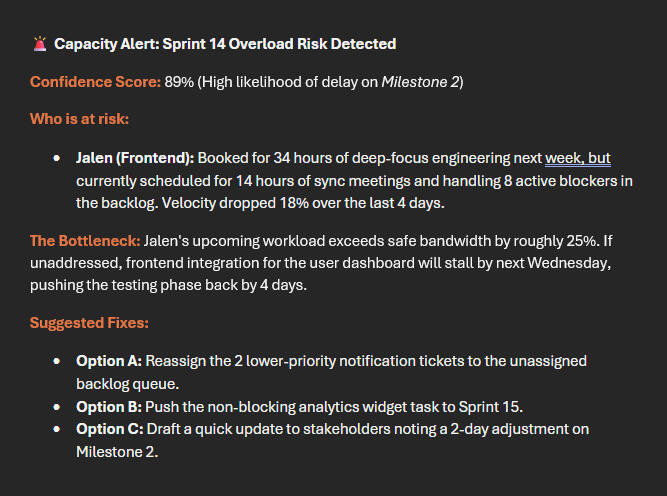
Example Agent Output:
When the agent detects a looming bottleneck, it pushes a clean, scannable briefing straight to your workspace or email. Here is what that snapshot looks like:

Why You Still Need a Human
AI agents are great at spotting numbers and patterns, but they don't have common sense or empathy. You still need a human to:
Read between the lines, a drop in speed might mean someone is dealing with a tough personal situation, not just slacking off.
Talk to people like humans: Having a real, supportive conversation with a teammate who is struggling is something an algorithm can never do.
Make the hard calls: Deciding whether to push back a deadline or cut features requires human judgment and stakeholder management.

The Result
Predictable delivery at a human pace
No more surprises: Caught three major workflow jams weeks before they could mess up the launch.
Happier team: Cut unnecessary overtime hours by 22% and kept the team moving at a steady, sustainable pace.
Better predictability: Hit the final delivery date smoothly without anyone having to pull an emergency weekend shift.